



Your Business May Be Paying for Software Nobody Uses
Businesses are spending thousands of dollars on software subscriptions every year. The surprising part? Some of those applications may not have been opened in months.
Imagine a business owner reviewing the company’s monthly credit card statement.
There are charges for Microsoft 365, Adobe, Zoom, a project management platform, customer relationship management software, an AI writing assistant, cloud storage, and several applications whose names are barely recognizable.
One subscription costs $29 a month. Another is $89. A third automatically renewed for an entire year.
Individually, the charges don’t seem particularly alarming.
But there’s one problem.
Nobody in the office seems to know who is using half of these applications.
It’s a scenario playing out in businesses of all sizes, and new research suggests that unused software subscriptions have become a significant source of unnecessary spending.
Nearly Two-Thirds of Software Licences Are Going Unused or Underutilized
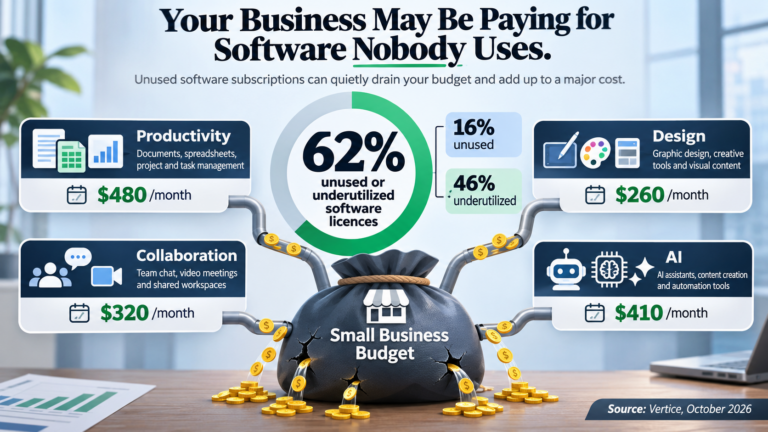
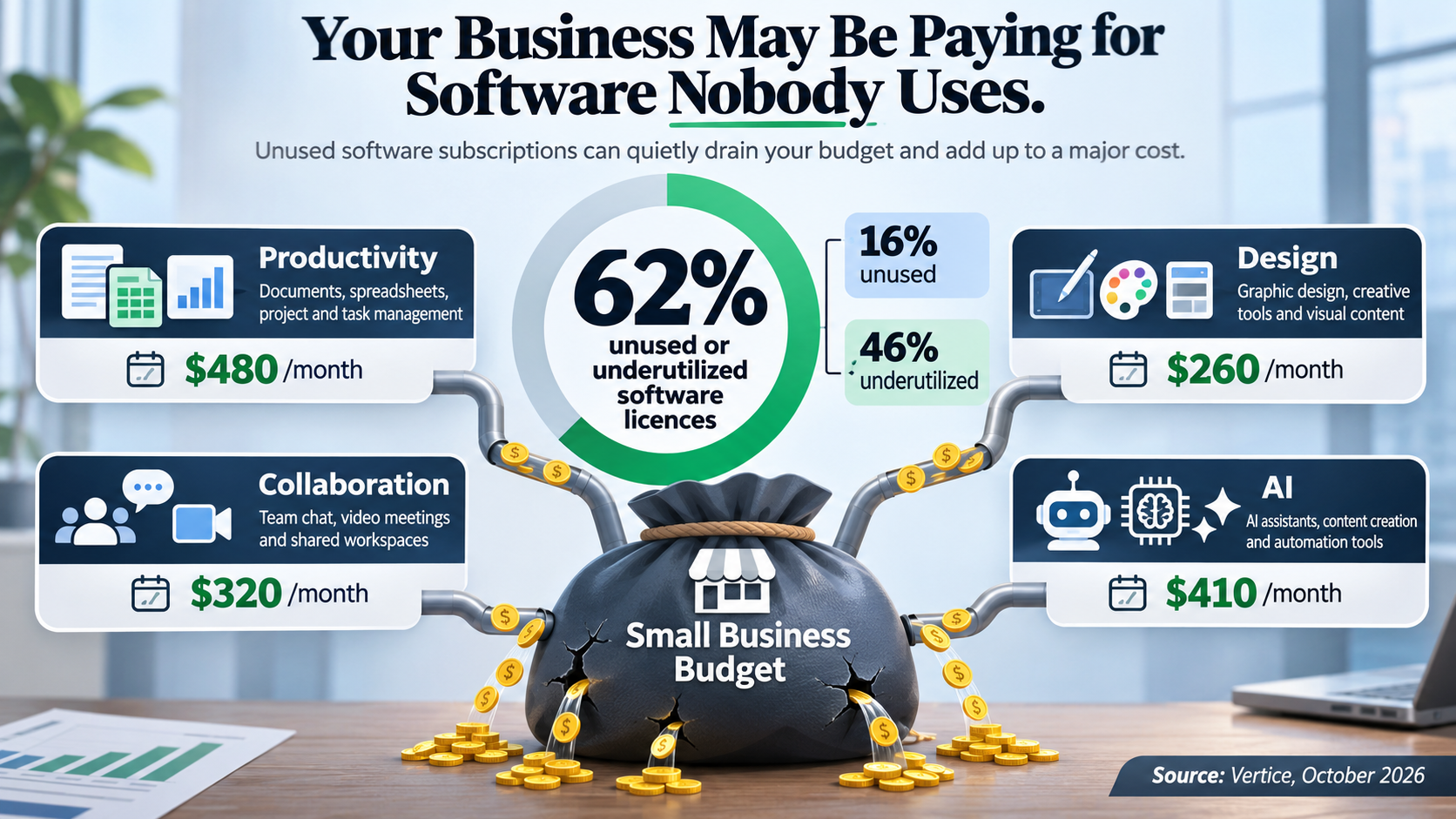
According to research published in October 2026 by software procurement company Vertice, 62% of the SaaS licences it tracks fall into the categories of unused or underutilized software.
The findings break down into two important categories:
- 16% are entirely unused. These represent software licences that organizations continue paying for but aren’t using.
- 46% are classified as underutilized. These are associated with software where less than half of the purchased licences are being used.
These figures are based on software spending and usage data managed by Vertice, rather than a census of every business. Nevertheless, they reveal how easily subscription costs can become disconnected from actual employee needs.
The problem is often referred to as “SaaS sprawl.”
SaaS stands for Software as a Service. Instead of purchasing software outright, businesses pay a recurring monthly or annual subscription to access cloud-based applications.
This model has made powerful business technology more accessible than ever.
Unfortunately, it has also made it remarkably easy to keep paying for software long after anyone needs it.
How Did Businesses End Up With So Many Subscriptions?
The growth happened gradually.
An employee needed a tool to manage a project. Someone in accounting subscribed to a reporting service. The marketing department started using a design application. A manager purchased a collaboration platform to help coordinate remote employees.
Every purchase probably made sense at the time.
But as businesses grow, employees leave, projects finish, and new technology replaces older applications, those subscriptions don’t always disappear.
They continue renewing.
Sometimes for years.
Making matters worse, software purchasing isn’t always centralized. One department may subscribe to an application without realizing another department already has software capable of performing the same task.
The result is a collection of overlapping subscriptions that nobody is reviewing as a whole.
Five Places Your Business Could Be Wasting Money on Software
1. Licences Assigned to Former Employees
When an employee leaves, companies usually remember to collect keys, laptops, and access cards.
But what happens to their software licences?
While a Microsoft 365 account may be properly disabled, subscriptions to other applications can remain active and billable if nobody specifically removes them.
Depending on the software, these may include design programs, project management tools, AI subscriptions, and industry-specific applications.
Businesses should have a consistent employee offboarding process that includes reviewing every assigned software licence.
2. Multiple Applications Doing the Same Job
Does your company pay for several different tools to manage tasks, share files, conduct video meetings, or communicate internally?
There’s nothing inherently wrong with using specialized applications. Some businesses genuinely need them.
However, companies frequently overlook capabilities already included in software subscriptions they’re paying for.
For example, certain Microsoft 365 plans include tools such as Teams, Planner, Forms, Lists, and Power Automate.
These may already provide functions that businesses are purchasing separately from other vendors.
A software review can reveal where existing technology could replace unnecessary duplicate subscriptions without sacrificing productivity.
3. Employees Paying for Premium Features They Don’t Need
Many software vendors offer multiple subscription tiers.
The premium version might include advanced reporting, automation, storage, or collaboration features that some employees never use.
Yet businesses often assign the same expensive plan to everyone simply because it’s easier to manage.
That convenience can become costly.
Reviewing licence requirements employee by employee may reveal opportunities to move occasional users to more appropriate plans.
The goal isn’t to take useful tools away from employees. It’s to match each person’s subscription to the work they actually perform.
4. Artificial Intelligence Subscriptions
AI has introduced an entirely new category of business software spending.
Companies are purchasing subscriptions to AI writing assistants, meeting summarizers, research tools, image generators, and productivity platforms.
Some of these applications deliver genuine value.
Others are purchased during a wave of enthusiasm, used for a few weeks, and then forgotten.
Businesses should ask a simple question about every paid AI tool:
Is this application measurably saving time, improving quality, or helping employees accomplish something they couldn’t do efficiently before?
If the answer isn’t clear, the subscription deserves another look.
5. Automatic Renewals Nobody Reviews
Automatic renewals are convenient for businesses that rely on continuous software access.
They can also become an expensive problem when nobody is responsible for monitoring contracts.
Some software agreements renew annually, and cancellation or licence reductions may require advance notice.
Missing that deadline can mean paying for another year of software the business no longer needs.
Every organization should maintain a central record of its software subscriptions, renewal dates, costs, and responsible employees.
Even a straightforward review schedule can prevent unnecessary expenses.
A Few Small Subscriptions Can Add Up Quickly
Consider a business paying for 20 software licences that nobody is actively using.
If each licence costs $40 per month, that’s $800 leaving the business every month.
Over a year, those unused subscriptions represent $9,600 in unnecessary expenses.
And that example doesn’t include duplicate applications, unnecessarily expensive subscription tiers, or annual contracts that automatically renew.
Now consider what that money could accomplish elsewhere in the business.
It could help fund equipment upgrades, employee training, process improvements, or other technology investments that deliver measurable returns.
Software waste isn’t simply an accounting problem.
It’s a missed opportunity to invest more effectively.
How to Conduct a Software Subscription Audit
Businesses don’t need to immediately cancel applications or make major changes to begin finding savings.
Start with a structured review.
- Build a complete inventory. Identify every paid software subscription, including purchases made through corporate credit cards, employee expense reports, and vendor invoices.
- Determine who uses each application. Review licence assignments and usage reports where available, and speak with department managers about whether the software is still needed.
- Identify duplicate functions. Look for applications performing tasks that existing company software may already handle.
- Review licence levels. Determine whether employees need premium subscriptions or whether less expensive plans would meet their requirements.
- Check renewal dates. Document annual commitments, cancellation requirements, and upcoming contract deadlines before making decisions.
- Assign ownership. Make one person or department responsible for approving new software purchases and conducting regular reviews.
One important caution: low usage doesn’t automatically mean software is unnecessary.
Backup systems, disaster recovery applications, regulatory reporting tools, and specialized business platforms may be essential even if employees rarely interact with them directly.
The objective is to eliminate waste, not remove technology that protects or supports important business operations.
Your IT Provider Should Help You Save Money, Not Just Fix Problems
Many business owners think of their IT support company primarily when something goes wrong.
A computer stops working. Email becomes unavailable. An employee needs technical assistance.
But a proactive IT provider should also help a business understand whether its technology spending is delivering value.
That includes reviewing software licences, identifying unnecessary applications, consolidating overlapping services, and ensuring employees are using the capabilities already available to them.
It also means considering the bigger picture before cancelling anything: employee productivity, business requirements, integrations, data retention, and contractual obligations.
The most effective technology strategy isn’t necessarily the one with the most software.
It’s the one that provides employees with the right tools at a reasonable cost.
Before You Buy More Software, Look at What You Already Own
Businesses are under constant pressure to adopt new technology.
There is always another productivity tool, automation platform, collaboration application, or AI subscription promising to help employees work more efficiently.
Some of those investments are worthwhile.
But before adding another monthly charge, companies should understand what they’re already paying for.
Because the next opportunity to improve your technology budget may not involve purchasing something new.
It may simply involve finding the software your business has forgotten it owns.
When Was the Last Time Your Business Reviewed Its Software Subscriptions?
A software licensing and subscription review can help identify unused licences, overlapping applications, unnecessary premium plans, and upcoming renewal expenses.
Your IT support provider can help evaluate the applications your employees actually need, determine where existing technology could do more, and uncover opportunities to reduce costs without sacrificing productivity.
Before committing to another year of software expenses, consider scheduling a review of your current technology subscriptions.
Research source: Vertice, Unused SaaS Applications, updated October 2026. Statistics reflect software licence usage tracked by Vertice and should not be interpreted as a measurement of every business.