




The Call Says It’s From IT. That Doesn’t Mean It Is.
Cybercriminals are increasingly impersonating help desks and support teams. The most dangerous part of the attack may be that nothing they ask you to use looks malicious.
Most employees have learned to be suspicious of strange email attachments and unexpected password-reset messages.
But what happens when the person contacting you appears to be from IT?
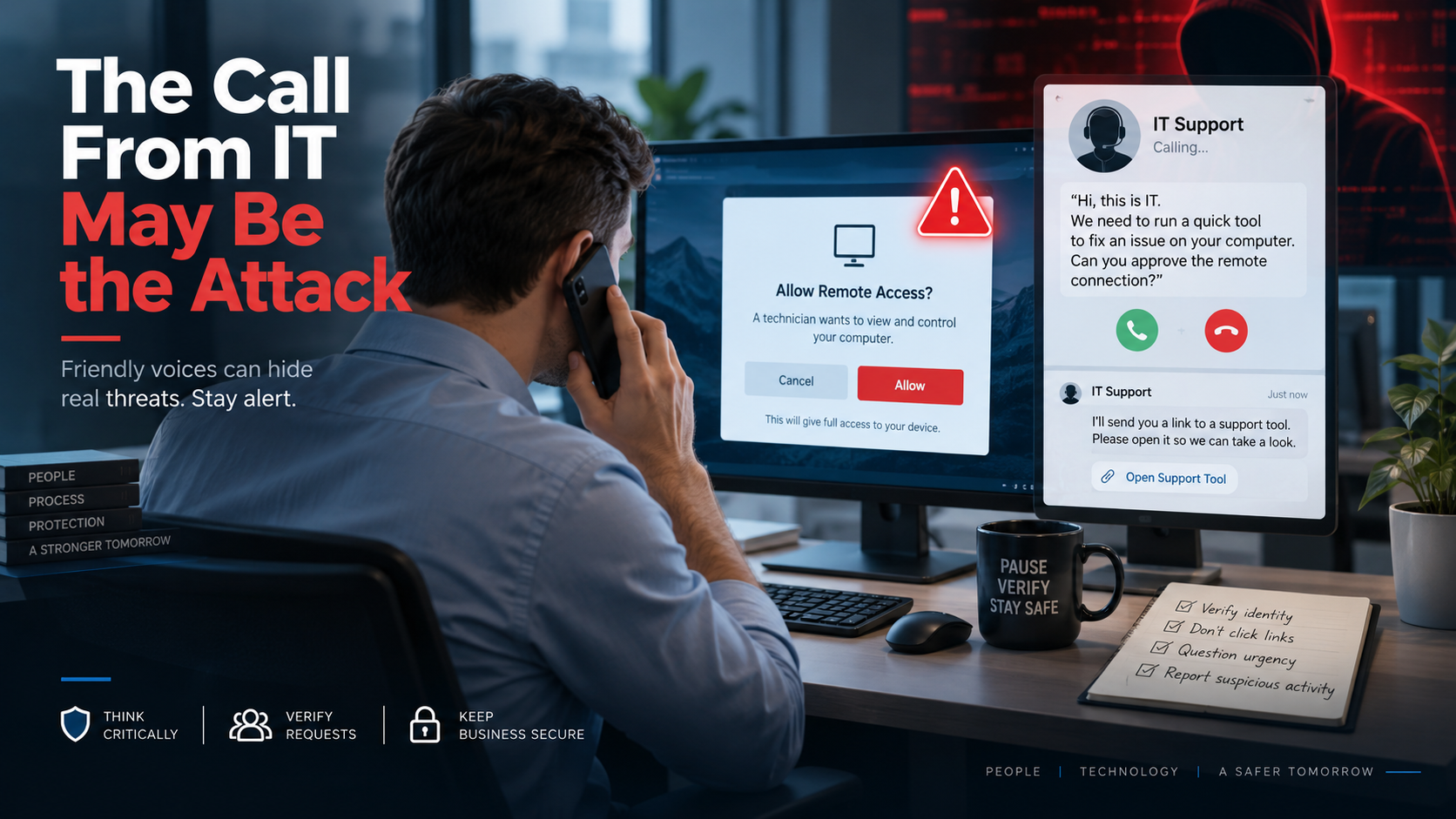
They know the language. They say there is a security problem with your computer. They contact you through Microsoft Teams or by phone. They may even ask you to use a legitimate remote-support tool already built into Windows.
Nothing immediately looks like malware.
That is exactly what makes this type of attack so effective.
Microsoft recently reported a human-operated intrusion campaign in which attackers impersonated IT and help-desk personnel through Microsoft Teams, then convinced employees to grant them remote access to their computers. Once that access was established, the attackers were able to expand their activity further into the organization.
The lesson for businesses is important:
Cybersecurity is no longer only about recognizing suspicious technology. Employees also need to recognize suspicious behavior.
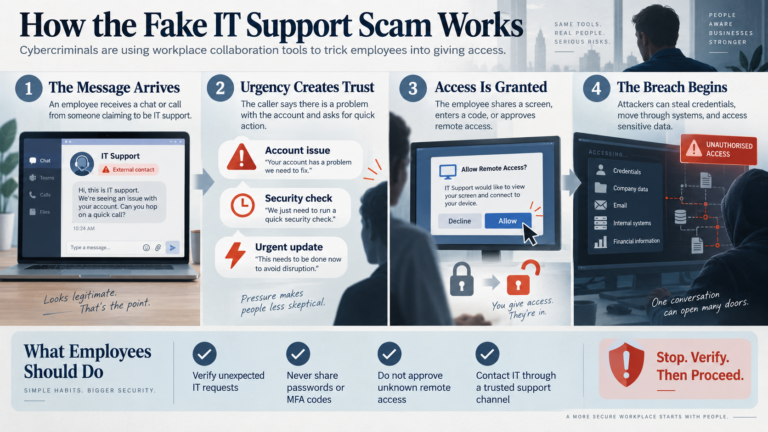
How the Fake IT Support Scam Works
The attack often begins with something that feels routine.
An employee receives an unexpected Microsoft Teams message, call, or other communication from someone claiming to be technical support.
The story may involve:
- a Microsoft security update
- an email or spam-filter problem
- an account that needs verification
- an urgent security issue
- a computer configuration problem
- an account that may supposedly be deactivated
The person offers to help.
That is where the attack becomes dangerous.
Microsoft observed attackers convincing users to approve remote-control requests during Teams sessions or to open legitimate remote-assistance software such as Quick Assist.
The attacker is not necessarily exploiting a vulnerability in Microsoft Teams or Windows.
The employee is being persuaded to give them access.
Why This Attack Can Be So Convincing
Most businesses legitimately use remote support.
When an employee has a computer problem, an IT technician may connect remotely to investigate it.
Employees therefore become accustomed to requests such as:
“Can I connect to your computer?”
“Please approve the remote session.”
“Can you open the support application?”
In a legitimate support situation, those requests can be completely normal.
Attackers understand that.
Instead of trying to make employees install obviously suspicious software, they can abuse familiar processes and legitimate tools.
This type of intrusion can blend into normal business activity because attackers may use trusted technologies including Teams, remote-support applications, and native Windows tools.
That means an employee cannot rely entirely on whether the software itself looks legitimate.
The more important question is:
Did I expect this person to contact me?
The Most Important Rule: Verify Unexpected Support Requests
If somebody unexpectedly contacts you claiming to be from IT and asks for access to your computer, do not immediately grant it.
Verify the request independently.
That could mean:
- calling your normal help-desk phone number
- opening your regular support portal
- contacting a known member of your IT team
- asking your manager
- using an internal Teams channel you already trust
Do not use the telephone number, link, or contact information supplied by the person who contacted you.
If the request is legitimate, taking an extra minute to verify it will not cause a problem.
If it is fraudulent, that minute could prevent a much larger security incident.
Pay Attention to External Microsoft Teams Contacts
Many organizations now conduct so much business through Microsoft Teams that employees naturally trust messages appearing there.
Attackers know this too.
Microsoft Teams can display indicators when someone from outside your organization attempts to initiate a conversation.
Employees should pay attention to labels indicating that someone is external.
An external person using the same name as someone from your IT department is still an external person.
That deserves verification.
Never Grant Remote Control Because Someone Creates Urgency
Social engineering frequently relies on urgency.
An attacker might claim:
- “Your account is about to be disabled.”
- “We detected a virus.”
- “Your computer is causing a network problem.”
- “This security update has to be installed immediately.”
The goal is to keep the employee focused on solving the supposed emergency rather than thinking about whether the request itself makes sense.
Legitimate IT departments occasionally deal with urgent problems.
But urgency should never eliminate verification.
If someone pressures you to skip normal procedures, that is a reason to become more cautious, not less.
Never Run Commands for an Unexpected Caller
Employees should also be cautious when someone claiming to be technical support asks them to:
- open PowerShell
- open Command Prompt
- download an unfamiliar file
- install software
- disable security software
- provide authentication codes
- approve an unexpected MFA request
- enter a remote-support code
Employees do not need to understand what every command does.
They simply need to know:
An unexpected caller should never be directing you to run commands or grant remote access without verification.
Businesses Should Establish a Simple Help-Desk Verification Process
This threat highlights something many organizations have never formally addressed:
How does an employee know that the person contacting them really is IT?
Every business should have an answer.
It might be as simple as:
IT will never initiate remote access without an existing support ticket.
Or:
If IT contacts you unexpectedly, call the help desk at the number listed on the company intranet before granting access.
Some organizations may establish internal verification phrases or other authentication procedures for support calls.
The procedure does not have to be complicated.
It just needs to be consistent.
What Employees Should Do If They Think They Already Granted Access
If an employee realizes they may have allowed an unauthorized person to remotely access their computer, the worst response is embarrassment followed by silence.
Report it immediately.
The IT or security team may need to:
- disconnect the affected device
- terminate active sessions
- reset credentials
- review account activity
- investigate remote-access software
- examine the device for unauthorized changes
- determine whether other systems were accessed
The faster the incident is reported, the better the chance of containing it.
Employees should understand that reporting something quickly is far more valuable than trying to determine on their own whether an attack actually occurred.
Remote Support Is Not the Problem
Remote-support technology remains extremely useful.
The problem is not Microsoft Teams.
It is not Quick Assist.
And it is not remote management itself.
The issue is trust.
Attackers increasingly try to make malicious activity look like normal business activity because employees have become better at identifying traditional phishing.
A suspicious attachment is easier to recognize.
A polite person claiming to be from IT who appears to be helping fix your computer can be much harder.
The 30-Second Security Lesson
If your organization only teaches employees one thing about this threat, make it this:
Someone unexpectedly claiming to be IT asks for remote access:
Stop.
They say the problem is urgent:
Still stop.
Verify the request using a contact method you already trust.
Only after verification should remote access be granted.
The Human Firewall Still Matters
Security software can block enormous numbers of threats.
Multi-factor authentication can protect accounts.
Endpoint security can detect suspicious activity.
Microsoft Teams can warn users about external contacts.
But no security product can completely eliminate an attack that succeeds because someone voluntarily grants a criminal access.
That is why employee awareness remains so important.
The next cybersecurity attack your organization faces may not begin with a suspicious attachment.
It may begin with a very friendly message:
“Hi, this is IT. We noticed a problem with your computer. Can I connect for a minute?”
Before clicking Allow, make sure you know who is really asking.